Back to the Mac (Book Pro)

So, about two months ago I wrote this: Returned.

Well, here I sit, writing this blog post on pretty much the exact computer I returned. I spent the better part of two months looking at alternatives. These ranged all across the spectrum, including Windows alternatives, and even creating a Hackintosh. As a last ditch effort, I even put an SSD drive in my old 2012 iMac just to see if it would be good enough.

It wasn’t. Though, to be fair, it was really the video card that just couldn’t keep up. I run a 3440×1440 monitor setup. Sure, it could drive the display, but not very well. At least I will have a speedier little build machine.

So, Hackintosh, right? The problem: I just can’t justify violated the EULA to build a computer that I plan to do business work on. So that option was out.

Refurbished? I did think about it, but I couldn’t really justify to myself the price difference between a refurb machine and the new machines and missing out on getting Thunderbolt 3.

So… it’s with great hesitation that I pulled the trigger and re-purchased the 15″ Mac Book Pro with Touch Bar. It is simply the best option given the choices, and I’m tired of waiting.

Back to the Mac (Book Pro)

D&D – Storytelling Fun

This is why I really enjoy D&D: epic encounters with friends.

Below is a brief recap I wrote for our first adventure in Storm King’s Thunder (very minor spoilers ahead).


Scarlett, on a quest of self discovery and looking to shed the ways of her past knows that Nightstone is small town with wealthy nobles that may be willing to pay for the services she’s been cultivating since her youth. Distancing herself from her previous run-ins with a noble that bears much ill will toward her is also on the top of her mind. Of course, if the winds of fortune change, the nobles could very well be her next target.

Saamasal is heading to Nightstone looking for answers, but only he knows the questions. Is it power? Knowledge? What Sam does know is that Nightstone is a town with an interesting history. The town got its name from a massive chunk of obsidian that once stands in the middle of the village square, or at least that it once did. Many have tried to decipher the strange glyphs that were carved into it and understand the magic that radiated from it, but it is still a mystery.

Along the path, Scarlett and Sam meet up with two other travellers: Bastion, a small halfling bard and Adrik, a stout looking dwarven barbarian. As night had already fallen, everyone was anxious to get to the city as soon as possible.

As the characters approached the town, a sporadic ringing of the church bell grew louder and louder. The drawbridge to the city was suspiciously down, and the town was eerily quiet, other than the obnoxious sound of the church bell.

Cautious, the adventurers made their way into town. As night had encroached, it was hard to see what had actually transpired in the town, but Scarlett reveals that boulders were strewn about town as if they had fallen from the sky, and the Nightstone that should be in the town square was missing.

Approaching the church to find out the source of the bells triggered the attention of two large, four legged beasts out of the shadows. The first was felled quickly by Adrik and Scarlett. But another emerged and was able to fell Adrik with a vicious bite. In a somewhat state of panic, Bastion, in hindsight against his better judgement, rushes forward letting out a booming thunderwave pushing the beast back.

It was not enough, and the sound echoed through the town square. The sound of the church bell ceased, and into the battle came four goblins flanking the characters.

Bastion, though able to miraculously shrug off the effects of a arrow from the darkness would fall as another struck him from behind. Sam would try valiantly to squash the beast, but the goblins were approaching. An arrow stuck him and nearly bringing him to death’s door. His wits were with him though and he was able to cast sleep to subdue the two surrounding goblins and the beast. Scarlett made an incredible shot with her crossbow into the darkness striking dead one of the two last remaining goblins.

In a last attempt to kill the two remaining adventurers, sensing their death shortly, the last goblin snuck around and was able to get behind Sam, whom had taken up shelter in the church. Turning and charging to the window, Saamasal crushed the last goblin with a single, devastating blow.

Shaken and badly wounded, the adventurers regrouped within the temple. Aiding their new acquaintances, Adrik and Bastion, all were able to slightly recover from the battle after taking about and hour to calm their nerves.

D&D – Storytelling Fun

Wizard Tradition: War Caster

Some old friends and I are going to be starting up a D&D game shortly. I’m pretty excited about it! Anyhow, I’ve got the hat of being the Dungeon Master this time around.

So, one of my players came to the group saying that he wanted to play a human, maul-wielding, war wizard. Sounds intriguing. He then presented a few ways he could go about doing it.

  1. Eldritch Knight – though, he wanted to remain a full caster, so this didn’t really suit his character.
  2. Wizard with the war caster feat – but this was a bit lacking and still forced an arcane tradition that didn’t suit his character.
  3. The Bladesinger arcane tradition from Sword Coast Adventurer’s Guide – again, this basically forced him to be an elf, and was really around being dexterity based fighter/wizard combo.

So, what’s a DM to do?

I’m of the philosophy that D&D is about playing the type of character you want to play. I thought the concept was good, so I decided to come up with a new arcane tradition.

The primary things I liked about this tradition:

  1. It kept the fighter/wizard combo and the Eldritch Knight significantly better at combat, especially combat with multiple enemies.
  2. It kept the Bladesinger better at dexterous combat and also at multiple enemy combat.
  3. Provide my player with an opportunity to play something that fit his character without any big compromises.

Our campaign is using the spell points rule variant, so that is listed in the table for easier reference for my players.


Warchanting

Warchanters are wizards that understand that the realm of the world is more than just scholarly pursuits and fancy endeavors of intricate magical incantations. In order to survive, it is often better to blend in with the more common folk around you. To do that, one must also be able to take a punch and not retaliate with a chilling touch or a fireball to the face. If one isn’t careful, one might end up and the end of an angry mob of townsfolk.

Foregoing the more in-depth studies that typical wizards undergo, the Warchanter instead devotes oneself to the studies of martial combat.

Training in War and Chant

When you adopt this tradition at 2nd level, you gain proficiency with light armor, and you gain proficiency with one type of melee weapon of your choice.

You also gain proficiency in either the Athletics or Acrobatics skill if you don’t already have it.

War Chant

Starting at 2nd level, you can invoke a secret magical incantation called the War Chant. It graces you with supernatural combat abilities and focus.

You can use a bonus action to start the War Chant, which lasts for 1 minute. It ends early if you are incapacitated or your concentration is broken. You can also end your War Chant on your turn as a bonus action.

Once you have used your War Chant the number of times shown for War Caster Wizard level in the War Chant table, you must finish a long rest before you can perform the incantation again.

While your War Chant is active, you gain the following benefits:

  • You gain a bonus to your attack strikes equal to your Intelligence modifier (minimum of +1).
  • You gain a bonus to your AC equal to your Intelligence modifier (minimum of +1).
  • You gain advantage to any Constitution saving throw you make to maintain your concentration on a spell.
  • You can perform the somatic components of spells even when you have weapons or a shield in one or both hands.

At level 20, you have become infused with your War Chant ability such that it is always active so long as you are conscious.

Improved Chanter’s Armor

Starting at 6th level, you gain the medium armor proficiency.

War Strike

Starting at 6th level, while performing your War Chant, your weapon becomes infused with arcane magic. Once on each of your turns when you hit a creature with a weapon attack, you can cause the attack roll to deal an extra 1d8 damage of the same type dealt by the weapon to the target.

When you reach 14th level, the extra damage increases to 2d8.

Greater Chanter’s Armor

Starting at 10th level, you gain the heavy armor proficiency.

Chant of Victory

Starting at 14th level, you add your Intelligence modifier (minimum of +1) to the damage of your melee weapon attacks while your War Chant is active.

Table 1: Warchanter
Class Level Proficiency Bonus Features Cantrips Known War Chants Spell Points Max Spell Level
1st +2 Spellcasting, Arcane Recovery 3 4 1st
2nd +2 War Chant Training 3 2 6 1st
3rd +2 3 3 14 2nd
4th +2 Ability Score Improvement 4 3 17 2nd
5th +3 4 3 27 3rd
6th +3 War Strike, Improved Chanter’s Armor 4 4 32 3rd
7th +3 4 4 38 4th
8th +3 Ability Score Improvement 4 4 44 4th
9th +4 4 4 57 5th
10th +4 Greater Chanter’s Armor 5 4 64 5th
11th +4 5 4 73 6th
12th +4 Ability Score Improvement 5 5 73 6th
13th +5 5 5 83 7th
14th +5 Improved War Strike, Chant of Victory 5 5 83 7th
15th +5 5 5 94 8th
16th +5 Ability Score Improvement 5 5 94 8th
17th +6 5 6 107 9th
18th +6 Spell Mastery 5 6 114 9th
19th +6 Ability Score Improvement 5 6 123 9th
20th +6 Signature Spell 5 Unlimited 133 9th
Wizard Tradition: War Caster

RetroBoy Advance – Sound On!

Time for sound… so where to start? As usual, www.digikey.com (too bad they don’t have an affiliate program!).

So, what are we looking for? A linear audio amplifier. The goal isn’t necessarily to get the cheapest, but rather to get the one that is going to fit the needs of the device. Namely:

  • mono speaker output
  • stereo headphone output

Looking through the options, LM4853MM/NOPB really sticks out to me as the big winner. Why? Great question!

From the data sheet:

The LM4853 can automatically switch between mono BTL and stereo SE modes utilizing a headphone sense pin. It is ideal for any system that provides both a monaural speaker output and a stereo line or headphone output.

This is exactly what I want! Also, this package has the friendly pins to make soldering easier.

Here is the “typical circuit” the data sheet provides too:

Screen Shot 2017-01-04 at 4.07.48 PM.png

Just look at the connections on the outside, the rest is the internal circuitry. Of course, some of the resistor and capacitor values might need to be tweaked, but it’s a great starting reference.

The thing that is missing from this is the volume control. For that, I’m going to need to do a bit more research. Until next time!

RetroBoy Advance – Sound On!

RetroBoy Advance – Power Indicators

The GameBoy Advance has a nice feature that when the batteries are getting low, the green “on” indicator changes to a “red” color.

So, how do we go about doing this? Honestly, as I start writing this blog post, I don’t know! Remember, I don’t know very much about this stuff at all. The only training I’ve had in electronics was back in high school. Hopefully at the end I’ll be able to come up with something that is working!

Iteration 0

I find that I learn best while exploring a solution through iterating over an approximate solution. The hope is that I can keep mutating my solution to get closer and closer to the real answer.

So, this is what I know: I want a battery indicator light. That’s simple enough!

Screen Shot 2016-12-27 at 8.43.23 PM.png
Power Indicator: Iteration 0 circuit design.

Simply hook up some power, a resistor (to limit the current going through the LED so we don’t blow it), and the LED to light up.

This is the base level.

Iteration 1

Now, for the next step, I’m going to need something a little more advanced. I know that I actually want two different LEDs: one green and one red. The green will be for “on with good battery levels”, and red for “on but battery levels are low”.

So, I also know one way to do this. The basic setup is to have two LEDs, two transistors, a power source, and a resistor hooked up.

Screen Shot 2016-12-27 at 9.18.32 PM.png
Power Indicator: Iteration 1 circuit design.


I have two power rails in the picture above:

  1. VCORE_MCP_5V – this is the 5V power rail that is created by the boost circuit.
  2. VCORE_BAT – this is the primary rail created from the batteries.

I need to use both here. I have two LEDs in parallel in the above circuit. My VCORE_BAT rail will only provide 2.4V~3.0V at max. Since many LEDs run on 2V, and since these are in parallel, I essentially need 2V for each of the LEDs. The VCORE_BAT rail simply cannot provide that.

Also, you can see that I’m using two transistors here. The goal is to be able to shut one of the gates based on a voltage level from the incoming VCORE_BAT rail to determine if the green or the red LED should be on. However, to do that, I still need to power the LEDs, and that will be done with the VCORE_MCP_5V rail.

Is this the right way to do it? I don’t know, but let’s see if we can make it work!

Testing This Stuff Out

Now might be a good time to talk about how I’m testing this out. I’m using a tool called EveryCircuit on iOS. It’s also available as a Chrome app as well. You can see this circuit here: http://everycircuit.com/circuit/6246606630551552.

circuit.png
The circuit under simulation using EveryCircuit.

Iteration 2

While trying out different things to see if the above is going to work, I realized that I’ll be needing something to compare two lines of voltages. To make that work, I needed to use something called a linear comparator. One interesting thing about a linear comparator is that you can have a positive or a negative voltage. Thus, I can essentially change the current flow direction.

This allows a setup like below:

Screen Shot 2016-12-28 at 11.12.32 PM.png

How did I come up with the MIC7221 as the linear comparator chip? Well, it was the cheapest on www.digikey.com at $0.27 per chip (at the time of writing)! I did have to do some research to determine the proper filters to use, so hopefully those are all correct.

The potentiometer (RV1) is a variable resistor that allows a smaller voltage to pass through depending on how open it is. This is great for this use case as I can adjust it to determine what I want to consider “low battery” (recall that a battery’s output voltage decreases as it becomes drained).

Here’s a link to the circuit to play with: http://everycircuit.com/circuit/5089351583399936.

Iteration 3

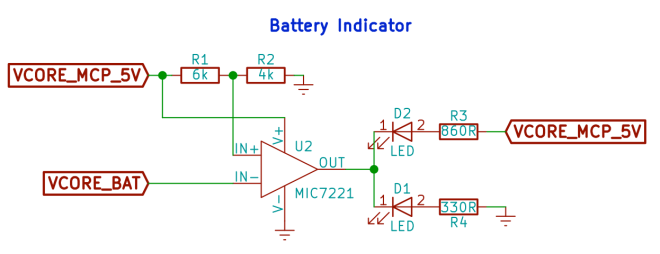
Now, as I was writing up the above, I realized that I was simply using the potentiometer as a voltage divider. Duh! In the final design, I don’t need to allow this to be varied. In fact, I don’t want to allow that as it would require more manual work. Instead, I simply want to hardcode the value with a voltage divider.

So here’s the updated circuit:

Screen Shot 2016-12-29 at 12.50.16 AM.png

Here’s a link to the circuit to play with: http://everycircuit.com/circuit/6330686118297600.

I think this works, but I don’t know exactly how much power this will draw from the batteries. It’s possible that I might need to use something like a buck converter to make this more efficient. However, if my calculations are correct, it should only be drawing about 0.04~0.05 watts.

Milestone 1

So that’s it, I’m calling the power indicator circuit finished. It may need some more tweaks later, but I think this is a good start. In fact, I think the entire power circuitry is now complete.

Here’s the full schematic update:

Screen Shot 2016-12-29 at 12.54.10 AM.png

RetroBoy Advance – Power Indicators

RetroBoy Advance – Picking Parts

Ok, the schematic is done. Well, I actually made some tweaks to it, so it now looks like this:

Capture.PNG
Circuit for the DC-DC step-up converter.

The changes focus primarily around the addition of the switch (SW1). The PWR_FLAG items are simply for KiCad to understand where the power lines are coming from.

Drawing the schematic is the “easy” part, now it’s time to actually assign each of those generic parts a very specific part so I can actually order them to start testing things out!

So, head on over to digikey.com and start searching! Remember to reference your datasheets for your components. For example, in the MCP1642 datasheet, it tells you exactly what type of input and output capacitors you should be looking for. When you find the part you want, you can add these details to your components:

Capture.PNG

So, as you can see, I’m using a 10μF ceramic X5R in a 0603 package. Perfect! This will do two things for me:

  1. Defines the footprint for the pads (the exposed copper) where the component will sit.
  2. Provides the details I need to generate a bill of material (BOM) to actually place an order for everything.

Time to go through the rest of the schematic and getting things figured out.

RetroBoy Advance – Picking Parts

RetroBoy Advance – More Power!

One of the first things I need to take care of is dealing with power. I debated back and forth on whether to use AA batteries, a battery pack, a charger, or a combination of all of the above. As this is v1 of my prototyping, I decided to go with the simplest route: AA batteries.

For the prototype, I’ll be using a Raspberry Pi Zero. This device requires 5V to run (I think it can actually run on as little as 3.3V). So, we need to somehow get my two 1.2V 1900mAh Eneloop rechargeable batteries to provide 5V. To do this, I need to create a DC-DC step-up converter (e.g. a boost converter).

There are lots ways to do this. However, the more efficient ways (at least to my knowledge) all use chip regulators to facilitate in the process. Lots of companies make these. One way I find this stuff is by heading over to www.digikey.com.

For our purposes, we know we want the following:

  1. Surface mount component
  2. The 8-MSOP package (basically exposes the pins for easier hand soldering)
  3. Maximum output voltage in the 5~5.5V range
  4. A step-up function regulator

That gives is basically this query: 8-MSOP, 5.5V max output, surface mount, step-up regulator. As you can see, there are basically two manufacturers that supply what I need (there are probably many others at different supplier sites).

At this point, I actually just when to the two websites and looked at the different chip offerings. There is a Microchip version that is gives me the constant 5V that I need. Why Microchip over ST? Well, I simply liked their docs and website better. ¯\_(ツ)_/¯

So, I went with the Microchip MCP1642B-50 chip.

If you look at their datasheets, they provide a lot of great information, including some very typical usage schematics. Perfect! I loaded up KiCad EDA (I tried a bunch of different software, this was the one I settled on) and started sketching out the first schematic, which is basically just a transcription from the data sheet.

power-regulator.PNG

Now, please be advised. I only have the most basic understanding of how this thing works, so please keep that in mind. 🙂

The other thing I really liked about the Microchip product is that it provides a mechanism to model out the circuit to make sure things are looking kosher.

RetroBoy Advance – More Power!

RetroBoy Advance, Kick Off

For Christmas, I wanted to create a portable gaming emulator for my kids. Now, there are a ton of tutorials out there, I even bought all of the parts to build out the PiGRRL Zero. I borrowed a 3D printer and printed out some samples… wow did they suck.

There are some nice 3D printers on the market, but there’s simply nothing within my price range that is going to be able to create something as nice as the original GameBoy Advance case – which, side note, is in my personal opinion, the best handheld form factor ever created. Seeing as how I can purchase one for about $10 with the proper buttons, it was time to rethink what I was building.

Now the goal is to figure out how to get all of this to fit properly within a GameBoy Advance case… I searched the interwebs for anything and game up with the realization that I’m going to have to create my own PCB, like this awesome example.

Why not simply use that one? Excellent question! The biggest reason is that for my GameBoy Advance clone, it absolutely must have the old-school cartridge feel. I think modern day gaming (and life in general) is really missing out on a lot of the tangible feel.

So, instead, I’ll use this as a good teaching experience for my oldest daughter and myself. I haven’t built a circuit board since high-school, and that was some pretty basic stuff.

I’ll be posting our journey here for those that may find this interesting. However, since I’m not an EE (electrical engineering) major, have no training in the field, and pretty much know nothing about what I’m doing, don’t expect too much epicness. 🙂

RetroBoy Advance, Kick Off

Mistakes Were Made

My family has been waiting for our new home to be completed here in San Luis Obispo. We finally started the move in process, which is never fun. I’m setting up my office and I’ve realized that I made a pretty stupid mistake – not enough power!!!

We bought a new construction home, so we had the option to run additional power while they were framing the house. We added one for a fridge in the garage (a family of 6, soon to be seven!) and a microwave in a pantry closet. I didn’t even think about my office. 😦

I just recently purchased a soldering station, flipped it over to check out the power requirements: 6A. That’s when it hit me – why oh why did I not run an additional circuit to the office!?!

My office has a 15A circuit on it, which supports a max of 1800 watts. Of course, you really should only have your circuits running at 80%, so that leaves 1440 watts for me to use.

Here’s my list of stuff (plus my wife’s as we are sharing it as a craft room / office):

Device Max (watts)
2013 Mac Pro 205
Main PC 200
Secondary PC 200
5k iMac 197
2011 iMac 170
Xbox One 120
Sewing Machine 100
Skiva USB Charging Station 84
Sony TV 75
Mackie Speakers 72
Soldering Iron 70
Dell 34″ UltraWide 55
Heat Gun 50
StarTech Drive Enclosure 48
Cricut 45
Samsung Monitor (purchased before my boycott started…) 36
Sony Soundbar 34
MacBook Charger 29
HP Printer 25
Yamaha DGX-650 13
Raspberry Pi Charger 12.5
Netgear Switch 12
Cable Modem 7
Eero 7
Apple TV 1.9
Total 1868.4

Well, crap.

There is some good news:

  1. These are all estimated peak wattage usage numbers, and
  2. Not all of these devices will be used simultaneously.

Moral of the story: always plan ahead for your power usage needs.

Mistakes Were Made

Composite Validators – Refined

I recently saw a post on how to compose different validators together. I thought it was a good start, but I think it didn’t go quite far enough, especially using the fact that Rob Napier has so kindly reminded us about Swift: types are the unit of composition in Swift.

Here’s the basic setup: there is a need to create some basic validation for email and passwords (the correctness of the validation rules is not important to the discussion).

Scott modeled out what how he conceptually thought of each, which I thought was good. I’ve put those models here, with only some minor name changes:

Email Validation
                ┌────────────────────────┐                
                │    email validation    │                
                └────────────────────────┘                
                             ▲                            
             ┌───────────────┴───────────────┐            
┌────────────────────────┐      ┌────────────────────────┐
│         empty          │      │     invalid format     │
└────────────────────────┘      └────────────────────────┘
Password Validation
                ┌────────────────────────┐          
                │  password validation   │                               
                └────────────────────────┘                               
                             ▲                                           
             ┌───────────────┴───────────────┐                           
┌────────────────────────┐      ┌────────────────────────┐               
│         empty          │      │          weak          │               
└────────────────────────┘      └────────────────────────┘               
                                             ▲                           
                                             │ ┌────────────────────────┐
                                             ├─│         length         │
                                             │ └────────────────────────┘
                                             │ ┌────────────────────────┐
                                             ├─│   missing uppercase    │
                                             │ └────────────────────────┘
                                             │ ┌────────────────────────┐
                                             ├─│   missing lowercase    │
                                             │ └────────────────────────┘
                                             │ ┌────────────────────────┐
                                             └─│     missing number     │
                                               └────────────────────────┘

I think these are conceptually good. However, I wasn’t a fan of how Scott transcribed these models over to their enum representations.

Scott’s Version
enum EmailValidatorError: Error {
    case empty
    case invalidFormat
}

enum PasswordValidatorError: Error {
    case empty
    case tooShort
    case noUppercaseLetter
    case noLowercaseLetter
    case noNumber
}

I think the PasswordValidationError missed the mark as he flattened out the tree.

My Version
enum EmailValidationError: Error {
	case empty
	case invalidFormat
}

enum PasswordValidationError: Error {
	case empty
	case weak(reasoning: [PasswordStrengthValidationError])
}

enum PasswordStrengthValidationError: Error {
	case length
	case missingUppercase
	case missingLowercase
	case missingNumber
}

I break out the weak items into their own PasswordStrengthValidationError error enum to match the conceptual model. This has the benefit of provide a high-level classification of “weak password” while still maintaining the rigor of getting the specific details about why the password is considered weak.

Validation

Next up is the modeling of the validator itself. I like that Scott chose to model this as a protocol. After all, we do know that we are going to need two different types of protocols:

  1. Single validation
  2. Composite validation

However, unlike Scott, I would have modeled both of these with a protocol, like so:

protocol Validator {
	func validate(_ value: String) -> Result
}

protocol CompositeValidator: Validator {
	var validators: [Validator] { get }
	func validate(_ value: String) -> [Result]
}

Side note: I’m also use a more generic Result type vs. Scott’s ValidationResult. It’s simply defined as:

enum Result {
	case ok(ValueType)
	case error(Error)
}

The important thing to note about the CompositeValidator is that it supports returning both a single result and a listing of all of the results. The other nice thing about this is that it’s also possible to provide a default implementation for all implementors of this protocol.

extension CompositeValidator {
	func validate(_ value: String) -> [Result] {
		return validators.map { $0.validate(value) }
	}

	func validate(_ value: String) -> Result {
		let results: [Result] = validate(value)
		let errors = results.filter {
			if case .error(_) = $0 {
				return true
			}
			else {
				return false
			}
		}

		return errors.first ?? .ok(value)
	}
}

In the single result case, we simply return the first error value, if present, or return the ok value. This default implementation will come in really handy when we start implementing things later on.

Types as the Foundation

Remember that types are the foundation? So yeah… let’s start implementing the email validators as they are the most straight-forward of the two.

class EmailEmptyValidator: Validator {
	func validate(_ value: String) -> Result {
		return value.isEmpty ? .error(EmailValidationError.empty) : .ok(value)
	}
}

class EmailFormatValidator: Validator {
	func validate(_ value: String) -> Result {
		let magicEmailRegexStolenFromTheInternet = "^[a-zA-Z0-9.!#$%&'*+/=?^_`{|}~-]+@[a-zA-Z0-9](?:[a-zA-Z0-9-]{0,61}[a-zA-Z0-9])?(?:\\.[a-zA-Z0-9](?:[a-zA-Z0-9-]{0,61}[a-zA-Z0-9])?)*$"

		let emailTest = NSPredicate(format:"SELF MATCHES %@", magicEmailRegexStolenFromTheInternet)

		return emailTest.evaluate(with: value) ?
			.ok(value) :
			.error(EmailValidationError.invalidFormat)
	}
}

The single value ones are fairly straight forward – you just implement the logic in the validate function based on the value passed in.

Now, to compose the email validations, all we need to do is this:

class EmailValidator: CompositeValidator {
	let validators: [Validator]

	init() {
		self.validators = [
			EmailEmptyValidator(),
			EmailFormatValidator()
		]
	}
}

That’s it! No extra code to worry about as the default CompositeValidator extensions handle this correctly.

The usage code looks like this:

let emailValidator = EmailValidator()
validate(value: "", validator: emailValidator)
validate(value: "invalidEmail@", validator: emailValidator)
validate(value: "validEmail@validDomain.com", validator: emailValidator)

Which will output:

value: "" => error(EmailValidationError.empty)
value: "invalidEmail@" => error(EmailValidationError.invalidFormat)
value: "validEmail@validDomain.com" => ok("validEmail@validDomain.com")

Password Validation

The single value password validators are all straight forward to implement:

class PasswordEmptyValidator: Validator {
	func validate(_ value: String) -> Result {
		return value.isEmpty ? .error(PasswordValidationError.empty) : .ok(value)
	}
}

class PasswordLengthValidator: Validator {
	static let minimumPasswordLength: Int = 8

	func validate(_ value: String) -> Result {
		return value.characters.count >= PasswordLengthValidator.minimumPasswordLength ?
			.ok(value) :
			.error(PasswordStrengthValidationError.length)
	}
}

class PasswordIncludesUppercaseValidator: Validator {
	func validate(_ value: String) -> Result {
		return value.rangeOfCharacter(from: NSCharacterSet.uppercaseLetters) != nil ?
			.ok(value) :
			.error(PasswordStrengthValidationError.missingUppercase)
	}
}

class PasswordIncludesLowercaseValidator: Validator {
	func validate(_ value: String) -> Result {
		return value.rangeOfCharacter(from: NSCharacterSet.lowercaseLetters) != nil ?
			.ok(value) :
			.error(PasswordStrengthValidationError.missingLowercase)
	}
}

class PasswordIncludesNumbersValidator: Validator {
	func validate(_ value: String) -> Result {
		return value.rangeOfCharacter(from: NSCharacterSet.decimalDigits) != nil ?
			.ok(value) :
			.error(PasswordStrengthValidationError.missingNumber)
	}
}

There really is nothing special going on here. However, what does the validation for the weak error type look like? Well, here it is:

class PasswordStrengthValidator: CompositeValidator {
	let validators: [Validator]

	init() {
		self.validators = [
			PasswordLengthValidator(),
			PasswordIncludesUppercaseValidator(),
			PasswordIncludesLowercaseValidator(),
			PasswordIncludesNumbersValidator()
		]
	}

	func validate(_ value: String) -> Result {
		let result = validate(value) as [Result]
		let errors = result.filter { if case .error(_) = $0 { return true }; return false }

		if errors.isEmpty { return .ok(value) }

		let reasons: [PasswordStrengthValidationError] = errors.map {
			if case let .error(reason) = $0 { return reason as! PasswordStrengthValidationError }
			fatalError("This code should never be reached. It is an error if it ever hits.")
		}

		return .error(PasswordValidationError.weak(reasoning: reasons))
	}
}

As you can see, it is necessary to change the default implementation of validate as we would like to do a custom conversion to box the potential list of failures reasons into a single weak value. If we modeled the error type as Scott had them, this step would be unnecessary.

Finally, we look at the all up composite validator for passwords:

class PasswordValidator: CompositeValidator {
	let validators: [Validator]

	init() {
		self.validators = [
			PasswordEmptyValidator(),
			PasswordStrengthValidator()
		]
	}
}

Again, we can simply use the default implementations for our two validate functions as there is no special logic we need here. The usage code is:

let passwordValidator = PasswordValidator()
validate(value: "", validator: passwordValidator)
validate(value: "psS$", validator: passwordValidator)
validate(value: "passw0rd", validator: passwordValidator)
validate(value: "paSSw0rd", validator: passwordValidator)

With the output of:

value: "" => error(PasswordValidationError.empty)
value: "psS$" => error(PasswordValidationError.weak([PasswordStrengthValidationError.length, PasswordStrengthValidationError.missingNumber]))
value: "passw0rd" => error(PasswordValidationError.weak([PasswordStrengthValidationError.missingUppercase]))
value: "paSSw0rd" => ok("paSSw0rd")

In the End

This is really just a refinement of Scott’s approach. I think he started off with the right thought process. The biggest critique I have about his approach is in the end when he needed to use functions to encapsulate the construction the various composite validators. Using functions as constructors can often times mean you simply don’t have the right type abstraction yet. I do believe that is the case here, which is why I introduced the CompositeValidator protocol.

Update: Here’s a link to the full playground source code: https://gist.github.com/owensd/6a99ca908d3c13c8b19c9a42aaf3cd9d.

Composite Validators – Refined